Right Desk. Right Person.
Right Time. Every Time.
Digicuro's Desk Booking & Management system lets your members find, reserve, and check into any desk, cabin, or meeting room in seconds — while you get real-time occupancy data, zero double bookings, and fully automated billing. All from one platform.
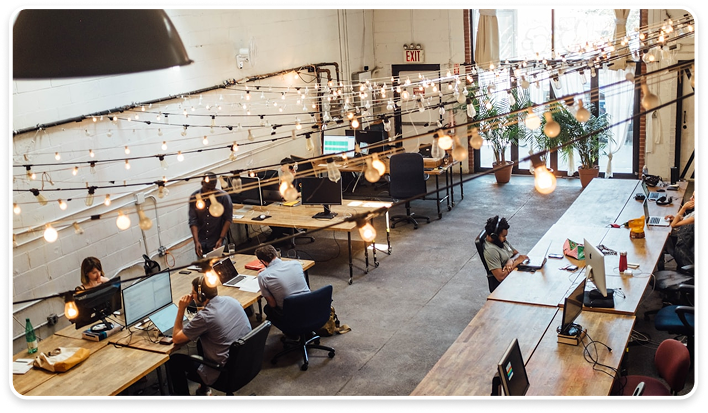
Powering desk and space bookings for 500+ locations across India and beyond




How Are You Managing Desk
Bookings Right Now?
If you're running a coworking space, hybrid office, or business center in India, desk management probably looks like one of these:
A Google Sheet with member names and desk numbers that's always out of date
Members messaging the admin on WhatsApp to "reserve their usual spot"
Double bookings that lead to awkward conversations every Monday morning
Hot desks sitting empty all day because nobody knew they were available
No idea which desks are actually used and which are just gathering dust
Billing for desk usage done manually at the end of the month always with errors
Digicuro Desk Booking: Smart, Self-Serve, Seamlessly Automated
Digicuro's Desk Booking & Management system puts the power in your members' hands — and full visibility in yours. Members browse your live interactive floor plan, pick their desk, and confirm in seconds. You see every booking in real time, eliminate conflicts instantly, and bill automatically without touching a spreadsheet.
Whether you're managing 10 hot desks or 500 workstations across multiple floors and locations, Digicuro handles it all from one platform.
Everything Your Space Needs to Book Smarter
Interactive Floor Plan Booking
Live map enabling instant booking of desks, cabins, meeting rooms, and phone booths in under 30 seconds with no calls or admin involvement.
Hot Desk & Dedicated Desk Management
Live visual map for instant works-pace booking in under 30 seconds, no calls, WhatsApp, or admin needed.
Real-Time Occupancy Tracking
Track real-time desk occupancy by location, floor, zone, or desk type via a live dashboard to optimize utiliza-tion, expansion, and pricing.
Booking Calendar & Conflict Prevention
Shared real-time calendar that pre-vents double bookings and gives ad-mins full control via web and mobile dashboards.
Advance & Recurring Bookings
Members can book desks in advance or set recurring reservations with automated confirmations and remin-ders to reduce no-shows.
Check-In & Check-Out Automation
Members can check in via QR code, face recognition, or app, with auto-matic release of no-show bookings to maximize desk utilization.
IoT-Powered Desk Sensors
Smart occupancy sensors detect real desk usage, flag empty bookings, and automate lighting and AC for energy efficiency.
Automated Billing for Desk Usage
Automatic billing for every desk boo-king with hourly, daily, and monthly plans, plus auto-generated invoices and no manual reconciliation.
Multi-Location Desk Management
Manage multiple branches from one admin panel with separate floor plans and calendars, all visible in a single consolidated dashboard.
Member Self-Service via App
Manage bookings, check-ins, cance-llations, history, and payments via a mobile app, with optional white-label branding for your organization.
Team & Enterprise Desk Allocation
Enterprise desk blocks with self-managed bookings, attendance, and access for team admins without operational involvement.
Usage Analytics & Reports
Dedicated enterprise desk blocks with self-managed bookings, atten-dance, and access controlled by team admins.
The Member Experience — Simple,
Fast, Satisfying
Total time from open to booked: under 60 seconds.
Open the app
Members open the Digicuro Space Management app (or your white-label version) and see your live floor plan.
Pick a desk
They tap any available desk on the interactive map. They can filter by type (hot desk, cabin, quiet zone), amenities, or floor.
Choose time slot
Select date, start time, and duration. The system shows availability in real time. One tap to confirm.
Check in
On arrival, they check in via QR code scan or face recognition. The desk status updates automatically.
Check out & pay
Check out when done. Billing is automatic with no interaction required from staff.
Everything You Need to Manage Desks the Smart Way
Manual / WhatsApp / Spreadsheet
- ✕Booking method - DM admin, call, or update a sheet
- ✕Double bookings - Happens regularly
- ✕Occupancy visibility - No real-time view
- ✕No-show handling - Desk sits empty, lost revenue
- ✕Billing accuracy - Manual, always errors
- ✕Member experience - Frustrating, dependent on admin
- ✕Multi-location management - Chaos
- ✕Data & reports - None
Digicuro Desk Booking
- ✓Member self-serves in-app in 60 sec
- ✓Impossible — system prevents it
- ✓Live dashboard, every desk
- ✓Auto-released after check-in window
- ✓100% automated, zero missed charges
- ✓Self-serve, instant, professional
- ✓One dashboard, all locations
- ✓Weekly/monthly utilization reports
Frequently Asked Questions
A: Yes. Members can book desks hours, days, or weeks in advance depending on the rules you set. You can also allow recurring bookings for members who want the same desk regularly.
A: Yes. Each location has its own floor plan and booking calendar, but you manage everything from one admin dashboard. Consolidated occupancy and revenue reports cover all locations.
A: Yes. Enterprise desk allocation lets you assign a block of desks to a corporate client. Their team admin manages assignments and bookings within that pool — independently.
A: For a standard space, the floor plan mapping and configuration takes 1–2 days. Members can start booking on day one.
A: Yes. Members book via the Digicuro Space Management app on Android or iOS. Admins manage everything via the Digicuro Admin app or the web dashboard. White-labeled mobile apps are also available under your own brand.
A: Yes — this is built into the core of the system. No two members can hold the same desk for overlapping time slots. The system handles conflict prevention entirely, without admin involvement.
Digicuro Desk Booking Solutions
Digicuro's Desk Booking & Management software is used by coworking spaces, hybrid offices, business centers, and managed workspaces across Delhi, Gurugram, Mumbai, Bangalore, Hyderabad, Noida, Pune, and beyond. Whether you manage 10 hot desks or 500 workstations across multiple locations, Digicuro's interactive floor plan booking, real-time occupancy tracking, and automated billing system gives you complete control — and your members a seamless experience. Part of India's most complete coworking space management platform.
Presence
Delhi, Gurugram, Mumbai, Bangalore, Hyderabad, Noida, Pune, & beyond.
Digicuro Desk Booking gives your
members a seamless self-serve
experience
Gives you the occupancy data conflict-free calendar, and automated billing you've always needed.
Book Your Free Demo Today→